
How to Remove Objects From Video Without Smears
How to remove objects from video: which shots are possible, the prompt that stops collateral edits, editor routes, and the free options worth using.
 Daniel Okafor 9 min read

Knowing how to remove objects from video is mostly knowing which shots are worth attempting. A tool has to erase the thing in every frame and then invent what was behind it, using only what the surrounding frames reveal. Where the camera moves and the background is briefly visible, that is easy. Where the object never moves and hides something the camera never saw, no tool can do it, and the honest answer is to reshoot or crop. Everything below was checked on the relevant product pages on 7 September 2026.
Why is removing an object from video harder than from a photo?
A photo needs one plausible patch. A clip needs a plausible patch in every frame, and each patch has to agree with the one before it. The underlying technique has a name: inpainting, described on Wikipedia as a conservation process in which damaged or missing parts are filled in to present a complete image, and applied to digital images and video as well as to paintings.
- Temporal consistency: a patch that changes slightly between frames reads as a shimmer, which the eye catches instantly.
- Occlusion history: the fill has to come from somewhere, usually a frame where the hidden area was visible.
- Motion: a moving object exposes background as it travels, which is a gift; a static one never does.
- Grain and compression: a rebuilt area that is too clean looks pasted onto footage that is not.

This is why a still-frame result can look perfect and the clip still fails. Judge any removal by scrubbing at full speed, never by pausing on one frame.
How do you remove an object from a video step by step?
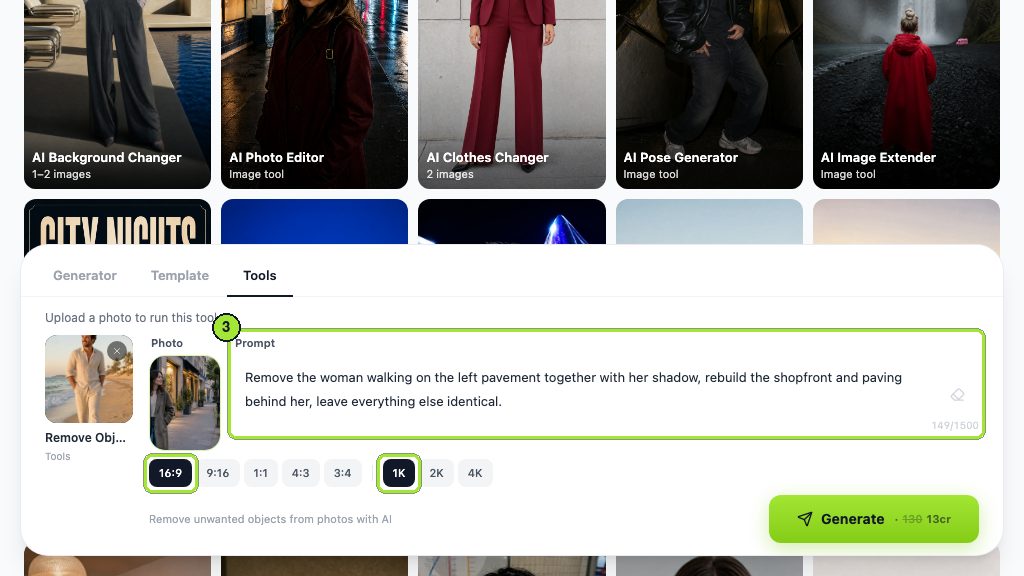
The prompt-driven route skips masking entirely. There is no brush and no mask in the workbench: you name the object in the Prompt box and the tool tracks it.
- 1
Trim to the shot
Cut the clip down to the single shot containing the object. A file with several cuts in it confuses the tracking.
- 2
Open the tool
Pick the AI video object remover from the Tools tab of the video workbench; the composer then shows one upload box and a Prompt box, and nothing else.
- 3
Upload the clip
Its page states that the original length and audio are kept, so you are not trading the soundtrack for the cleanup.
- 4
Describe the object precisely
Name it by position and appearance: the parked car on the right, the person in the red coat. Vague nouns take vague things with them.
- 5
Say what must stay
Add a clause protecting anything nearby that you want untouched. This is the single highest-value habit in the whole workflow.
- 6
Read the price, then generate
The cost in credits is printed on Generate itself, so nothing is spent before you have seen it.
- 7
Scrub the whole clip
Look at the moment the object enters or leaves frame and at any point where something passes in front of it.
- 8
Re-run with tighter wording
If the fill wandered, change the description before you change anything else.
Which shots are easy and which are impossible?
Decide before you spend anything. This table is the whole triage.
| Shot | Difficulty | Why |
|---|---|---|
| Locked camera, object moves through | Easy | Clean background exists in other frames |
| Panning camera, static object | Easy | The pan reveals what sits behind it |
| Locked camera, static object | Hard | Nothing ever shows what is behind it |
| Object overlapping a face or hands | Hard | The fill has to invent anatomy |
| Reflections and shadows of the object | Hard | Removing the object leaves its shadow behind |
| Object against a repeating pattern | Medium | Patterns rebuild well but tile visibly if the fill drifts |
| Heavy motion blur across the object | Very hard | No sharp edge for the tracker to hold |
Check for the shadow first
Before you run anything, look for the object's shadow and its reflection. If either is in frame, name both in the prompt or you will delete a person and leave their outline on the pavement.
How do you remove a person walking through the background?
The most common real request, and usually the easiest, because a walking figure reveals the background as it goes.
- 1
Name their position and clothing
Not the person: the man in the pale jacket crossing behind the subject, from left to right.
- 2
Include the shadow in the same sentence
Shadows are separate objects as far as the fill is concerned.
- 3
Protect the foreground explicitly
State that the main subject, their pose and the lighting stay unchanged.
- 4
Check the frames where they overlap the subject
That overlap is where a removal turns into a hole in someone's shoulder.

That pair is worth studying, because it shows the failure mode nobody warns about. In our September 2026 test run the tool removed the woman we named and also cleared parked bicycles that no instruction mentioned. Prompt-driven removal has no mask to constrain it, so the protective clause is not politeness; it is the only boundary the tool has. The still-image equivalent, remove object from photo, behaves the same way and is the cheaper place to learn the wording.
How do you remove an object in CapCut, Premiere Pro or DaVinci Resolve?
Editors take the mask-and-track route rather than the describe-it route, and the shape of the job is the same in each.
- Mask the object on one frame, track the mask forward and backward, then fill from a clean plate or a patch layer.
- CapCut is the phone-first answer and lists AI People Remover, AI Inpainting and an AI Text Remover among its tools. That covers most of what people mean by how to remove objects from video in capcut and by how to remove objects from video on iphone.
- DaVinci Resolve, at version 21 on Blackmagic's product page, handles this in Fusion with a tracker and a paint node, and the free edition is enough for short cleanups.
- Runway offers the job inside its browser suite alongside generation and editing.
- Adobe's help pages would not load for me on the day of writing, so I am not quoting menu paths for how to remove objects from video in after effects or how to remove objects from video in premiere pro. The mask, track and patch sequence above is what those workflows do.

The practical difference is where the effort goes. Masking gives you precise control and costs your afternoon; describing costs a render and gives you less control over what else disappears.
Can you remove objects from video for free?
Partly, and the limits are about volume rather than features. Anyone searching how to remove objects from video for free, or simply remove object from video free, is choosing between three kinds of allowance.
- Credit-metered tools: our pricing page lists an entry plan refreshing 40 credits each month with no card required, which covers a few short cleanups rather than a project.
- Free desktop software: the free edition of Resolve includes the masking and paint tools, so the only cost is your time and a machine that can run it.
- Phone apps: free tiers usually export with a watermark or a resolution cap, which you should check before you commit an edit to one.
- Trials on browser suites: fine for judging quality, not for a delivery schedule.
One number worth knowing before you plan a batch: LazyKiwi workbench figures for August 2026 put 22 of 39 external video jobs at 9:16, and a vertical crop is itself a legitimate way to remove something at the edge of frame for nothing.

Generation is the other half of the same budget. If a shot cannot be cleaned, replacing it outright is sometimes cheaper than fighting it, and Hailuo will build a short substitute clip from a description or a still.
Should you remove a watermark or logo from someone else's video?
No, and this article will not show you how. A watermark on someone else's footage is an ownership mark, and stripping it to reuse the clip is a copyright problem wearing a technical costume. There is no version of that workflow this site will publish.
- Removing your own watermark from your own footage is fine. Keep the unmarked master instead and the question disappears.
- Clearing a brand logo from a product you filmed yourself is normal production work, not watermark removal.
- Passing off footage you did not shoot, cleaned of its mark, is a rights issue whatever tool produced it.
- For commercial work there is a second layer: the FTC's endorsement guides FAQ is blunt about endorsements from non-existent people, calling them clearly deceptive and putting enforcement risk on the purchaser as well as the seller. The same principle reads across to fabricated material.
Removing an object from your own footage is craft. Removing someone else's mark from their footage is a different question, and the tool is not the part that decides it.
— Daniel Okafor, Video Workflows Editor
What makes an object removal obvious?
Six tells, in the order viewers notice them.
- A patch that shimmers or breathes while everything around it holds still.
- A leftover shadow or reflection with nothing casting it.
- Background detail that repeats where a pattern was rebuilt.
- A soft, clean area sitting inside grainy or compressed footage.
- Edges that ghost when something passes in front of the removed area.
- Collateral removals: objects nobody asked to delete quietly disappearing along with the target.

When a shot resists every attempt, the professional answer is usually not another render. Reframe, crop, cut around the offending seconds, or shoot the plate again. Trade coverage such as No Film School and PremiumBeat is worth reading on when a cleanup is genuinely cheaper than a reshoot, and the honest answer more often than people expect is that it is not.
Key takeaways
- A moving object or a moving camera makes removal easy; a static object in a locked shot often makes it impossible.
- Name the target by position and appearance, and add a clause protecting what must stay unchanged.
- Shadows and reflections are separate objects and have to be named separately.
- Prompt-driven removal has no mask, so collateral edits happen: in our own test the tool also cleared bicycles nobody mentioned.
- Judge every result by scrubbing at full speed, never by pausing on a single frame.
Video Workflows Editor
Daniel Okafor
I run the same clip through every video model we ship and write down what actually changes: motion, timing, cost, and where each one falls apart.
FAQ
Common questions
Can I remove a person standing still in a locked shot?
Usually not convincingly. If neither the camera nor the person ever moves, no frame in the clip shows what is behind them, so the fill has to be invented and it will drift between frames. Reframe the shot, crop, or cut around those seconds instead.
Do I need to mask the object?
Not in the prompt-driven tool. You describe the object in plain words and it is tracked through the clip. Editors take the other route, where you mask on one frame, track the mask through the shot and patch behind it, which is slower but gives you precise control over what is affected.
Why did it remove something I did not ask about?
Because there is no mask to constrain it. A text instruction defines a target, not a boundary. In our own September 2026 test the tool cleared parked bicycles alongside the person named in the prompt. Adding a clause that protects the rest of the frame is the fix.
Does the audio survive?
Yes. The tool page for the remover promises the clip comes back at its original length with the sound intact. That matters more than it sounds: a cleanup that re-times or re-encodes the clip forces you to re-sync everything downstream in the edit.
Can I take a watermark off a video I found online?
That is a rights question rather than a technical one, and this article does not cover it. Removing your own mark from your own footage is fine, and keeping an unmarked master makes the question moot. Using someone else's clip without their mark is a copyright problem.
Erase it by describing it
Upload the clip, name what should go and what must stay, and keep the original length and audio.
Related reading

How to Make a Music Video on a Small Budget
Treatment, shot list, generation and edit: a repeatable pipeline for a music video made with AI clips, timed to the track.
8 min read
Character Swap AI: How to Replace a Subject
Swap the person in a clip while the motion stays: what the tool needs, where identity drifts, and the consent rules you cannot skip.
8 min read
How to Make a Stop Motion Video From Scratch
Frame rate and hold, the home rig, lighting that will not flicker, and where AI simulation helps or gets in the way.
9 min read
Best AI Video Editor in 2026: 7 Picks, Free and Paid
Seven of the best AI video editors compared on prices checked today, free tiers, captions, text-based cuts and generative tools, plus where LazyKiwi fits.
10 min read